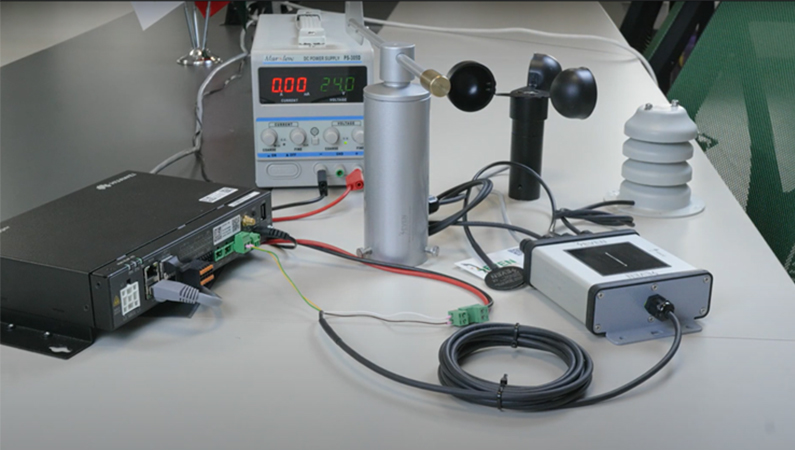
“I once spent half a day debugging why our SCADA system wouldn’t accept irradiance readings. What is the problem? I was accidentally trying to write to an input register. Lesson learned.”
Whether you are fine-tuning your PV monitoring system or just trying to make sense of a Modbus map, knowing the difference between input registers and holding registers is crucial, not just for communication, but for avoiding headaches in the field.
What Are Modbus Registers?
Modbus devices, like the SEVEN 3S-IS irradiance and temperature sensors, store data in numbered memory locations called registers. These registers are how your SCADA, datalogger, or PLC communicates with the device. But not all registers are created equal.
You will mostly deal with two types:
- Input Registers (Function Code 04): read-only, used for sensor measurements
- Holding Registers (Function Code 03): read/write, used for sensor measurements and/or configuration and control
Input Registers: For Live Data, Look But Don’t Touch
Input registers are read-only. They hold real-time measurement values reported by the sensor. You can read them, but any attempt to write to them will be met with a Modbus error.
How SEVEN Sensors arrange registers (examples you’ll use)
- Register 30006 → Temperature-Compensated Irradiance
- Type: uint16_t, Range: 0–1600 W/m², Resolution: 0.1 W/m²
- Register 30021 → Module Temperature
- Type: int16_t, Range: –40°C to +85°C, Resolution: 0.1°C
- Register 30053 → Wind Speed
- Type: uint16_t, Range: 0–40 m/s, Resolution: 0.1 m/s

Field Tip: If your irradiance value is returning 0 or is not updating, double-check that your system is using function code 04 and pointing to the correct input register (like 30006 for irradiance).
Holding Registers: Settings, Calibration & Control
Holding registers are where the action happens. For example, if you want to change the device’s Modbus address, configure baud rate, or adjust parity, you will use a write command like: 01 46 06 [Baude] [Parity] [CRC].
Unlike input registers, holding registers support both read and write operations.
Real Holding Register Examples from SEVEN:
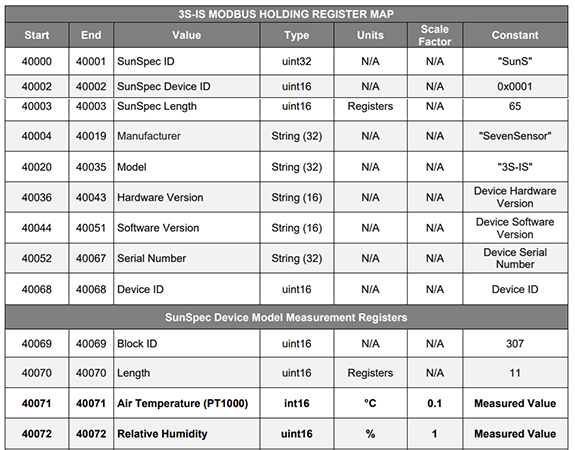
- Register 40001 → SunSpec ID
- Used to identify the device as SunSpec-compliant
- Register 40071 → Air Temperature (PT1000)
- Format: int16_t, Scale: 0.1°C — actual measured value
- Register 40091 → Module Temperature 1 (Back of Module)
- Format: int16_t, can be used in thermal models or inverter derating logic
You might also use registers like 40068 for Device ID or 40004–40019 to read the manufacturer name (“SevenSensor”).
Can Holding Registers Be Read-Only?
Yes, and this is an important distinction often missed in Modbus documentation.
While holding registers are technically read/write, a device’s firmware can restrict write access to specific registers. That means:
- You read them using Function Code 03 as usual.
- But if you try to write to those “read-only” holding registers, the device will return a Modbus exception error (like 0x03 or 0x02).
This behavior is common in SunSpec-compliant devices. For example:
- Registers 40084 (Global Horizontal Irradiance)
- Register 40091 (Module Temperature 1)
…are located in the holding register range, but they are actually sensor measurements, not configuration values. So they appear like you can write to them, but in practice, they are read-only.
Why did SEVEN arranged it this way?
- To standardize access to both configuration and data via Function Code 03
- To make it easier for SCADA systems that poll everything from one function space
Best Practice: Always check the Modbus map or device documentation to see which holding registers are truly writable.

Why Does the Difference between Input and Holding Registers Matter?
If you mix them up, things break. Plain and simple.
For Field Technicians:
- Use input registers to verify actual sensor outputs.
- Don’t try to write to them; that is how Modbus errors happen.
For SCADA Programmers:
- Use holding registers during commissioning (e.g., assign Modbus ID using register 40001).
- Ensure your polling uses the correct function code (03 vs 04).
For Troubleshooting:
- Strange values? Check if the wrong register type is being used.
- Off readings? Look at offset or scale settings stored in holding registers.
Real-Life Scenario with SEVEN Irradiance Sensor
Let’s say you are setting up a SEVEN irradiance sensor:
- You want to read the Temperature-compensated irradiance data →
Use Input Register 30006, function code 04. - You want to change the Modbus ID from 1 to 5 →
Use Holding Register 40068, write value using the function code as follows: 01 46 04 [ID] [CRC]. Don’t forget to reset the software after that. - You try writing to 30000?
You will get a Modbus exception error. The sensor won’t accept it.
Comparison Table of Input Registers Vs Holding Registers
| Feature | Input Registers (30000–39999) | Holding Registers (40000–49999) |
| Function Code | 04 (Read Input Registers) | 03 (Read/Write Holding Registers) |
| Access Type | Read-only | Read/Write (sometimes read-only by firmware) |
| Common Usage | Live sensor data (e.g., irradiance, temp) | Configuration, calibration, and control |
| Data Type Examples | uint16_t, int16_t | uint16_t, int16_t, text blocks |
| Real Examples (SEVEN) | 30006: Temp. Comp. Irradiance (W/m²) | 40001: SunSpec ID, 40068: Modbus ID |
| Write Attempts Allowed? | No, returns Modbus error | Yes if register is writable |
| Use in SCADA/Dataloggers | Reading sensor values only | Reading/writing setpoints or metadata |
| Can contain measurements? | Yes | Yes, especially in SunSpec devices |
| Best Practice | Use for monitoring only | Use with caution; verify write permissions |
Understanding the difference between input and holding registers is not just theoretical, it saves time, prevents configurations errors, and keeps your PV system running smoothly.
So next time you are digging into a Modbus map like the one from SEVEN Sensors, remember:
- Input Registers = Measurements (read-only)
- Holding Registers = Measurement & Settings (read/write)
Frequently Asked Questions (FAQ)
Why do some measurements appear in holding registers instead of input registers?
SunSpec devices often standardize everything under holding registers for simpler SCADA integration.
What happens if I try to write to an input register?
The device will return a Modbus exception error and ignore the command.
How can I quickly check if a holding register is writable?
Always consult the Modbus Map or device documentation; firmware may restrict write access.
Which register should I use for irradiance values in SEVEN sensors?
Use input register 30006 (temperature-compensated irradiance).