Downloads
* Hardware and Software Versions are written on the sensor box.
SEVEN Sensor Documentation & Downloads | Manuals, Datasheets, Modbus Maps, Setting Instructions, Compatibility Lists, Certificates & Configuration Tools

Download the official SEVEN sensor configuration tools, along with the Modbus maps, datasheets, user manuals, setting instructions, compatibility lists and calibration certificates. Select your sensor model and the relevant versions of the hardware and software to ensure you download the correct file. You can also search for calibration certificates using the serial and certificate numbers.
This page provides fast access to official installation, configuration, commissioning, troubleshooting and documentation files for SEVEN sensors.
Which Configuration Tool Do I Need for My Sensor?
Use the configuration tool for tasks such as:
- setting Modbus ID
- adjusting baud rate
- selecting parity
- updating firmware when required
- configuring certain information for selected sensor models such as soiling sensors
- testing communication
Choose your sensor model, then select the hardware version and software version written on the sensor to get the correct file.

How Do I Download the Correct Modbus Map?

Use the Modbus Map download to access the register definitions for your sensor, including the relevant input and holding registers for the hardware and software version you have in hand.
To download the correct Modbus map:
- Select your sensor model
- Select the hardware version
- Select the software version
- Download the matching map
Where Can I Find Datasheets and User Manuals?

Technical files help you choose, install, wire, and operate your SEVEN sensor correctly. Depending on the product, available documents include:
- datasheets
- user manuals
- wiring diagrams
- installation instructions
- configuration information
- technical specifications
You can find technical documents for multiple SEVEN product families, including irradiance sensors, thermopile pyranometers, module temperature sensors, ambient temperature sensors, wind sensors, relative humidity sensors, soiling sensors, compact weather stations, albedometers, and snow sensors.
How Can I Retrieve a Calibration Certificate?

Use the calibration certificate search when you want a digital copy of the certificate for the SEVEN irradiance sensor and thermopile pyranometer orders. Simply enter the serial number and certificate number written on the sensor and search, with an option to print all calibration certificates for the order at once.
To retrieve your certificate:
- Enter the Serial Number
- Enter the Certificate Number Labeled on the Sensor
- Select whether you want to print all certificates for the order
- Click Search
What Are Setting Instructions Used For?

Setting instructions provide step-by-step guidance for configuring SEVEN sensors correctly into well known datalogger brands such as Huawei, Goodwe, SMA, Bluelog, Sungrow, Growatt, Kehua Tech, Solax, and Solplanet. These files are especially useful during commissioning when you need quick setup guidance for a specific device.
Depending on the product, setting instructions may help you with:
- communication setup
- Modbus parameter adjustment
- device addressing
- output configuration
- model-specific setup details
What Is Included in Compatibility Lists?

Compatibility lists show which SEVEN sensors can be used with supported datalogger brands. These documents are especially helpful for project planning, inverter connection checks, and logger selection.
A compatibility list may help you confirm:
- which SEVEN sensor models are supported
- which datalogger models are compatible
- supported communication types
- wiring or integration notes
- model-specific limitations or requirements
These files are useful before installation because they reduce guesswork and help confirm that the selected sensor and monitoring equipment will work together as expected.
Where Can I Find the Catalog and Company Certificates?
SEVEN Catalog gives you a broader product overview and help with product selection, project planning, and technical comparison across the SEVEN product range. It is useful when you want to review available models, outputs, accessories, or complete weather and monitoring solutions.
The company certificates provide official SEVEN documents related to company standards, registrations, and compliance.
Use this section when you need:
- a general overview of SEVEN products
- help comparing product families
- trademark certificates
- registration documents
- company compliance certificates
- other official corporate documentation
Which File Type Should I Use for SEVEN Sensors?
| File Type | What It Is Used For | Best For |
|---|---|---|
| Datasheet | Technical specifications and model overview | Product selection and comparison |
| User Manual | Installation, wiring, setup, and operation guidance | Installers, technicians, O&M teams |
| Modbus Map | Register addresses and communication details | SCADA, PLC, and Modbus integration |
| Configuration Tool | Modbus parameter changes, firmware updates, advanced sensor configuration, testing communication | Commissioning, testing, and service |
| Calibration Certificate | Calibration proof and traceability record | Quality records, project documentation, audits |
| Setting Instructions | Step-by-step model-specific setup guidance | Commissioning, maintenance, replacement work |
| Compatibility List | Confirms supported integration with third-party devices or systems | Project design, inverter/logger matching, integration planning |
| Catalog & Certificates | Product family overview, model comparison. Official company-level documents such as ISO, trademark, or registration certificates. | Product planning, system design, sales support. Compliance, vendor approval, documentation. |
Which SEVEN Sensors Are Covered on This Page?
Official downloads are available for the following SEVEN product families:
Frequently Asked Questions (FAQ)
Where can I find the hardware version and software version of my SEVEN Sensor?
The hardware version and software version are written on the sensor box.
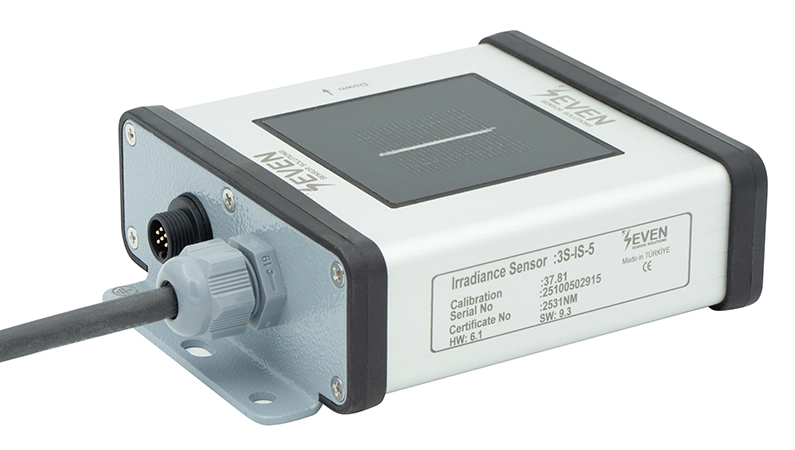
Why do I need to select the software version for a Modbus map?
Because register details can depend on the software version installed on the sensor. The current download page already organizes Modbus maps by model, hardware version, and software version.
What is the configuration tool used for?
It is used to configure communication parameters such as Modbus ID, baud rate, and parity, and in some cases to update firmware or configure supported sensor models. Additionally it can also be used to test whether the sensor is communicating properly or not.
What are setting instructions?
Setting instructions are brand-specific setup guides that explain how to configure or adjust supported devices correctly. They are especially useful during commissioning and service work.
What is a compatibility list?
A compatibility list is a reference document that shows whether a SEVEN sensor is supported by a specific inverter, logger, or third-party system. It helps you confirm compatibility before installation.
What is a Modbus map?
A Modbus map is a document that defines register addresses, data types, and communication structure for integrating the sensor into SCADA, PLC, or monitoring systems.
Which details are required to retrieve a calibration certificate?
You need the serial number and certificate number. The current page also includes an option to print all certificates for the order.
What should I do if I cannot find my file?
Contact the SEVEN Sensor team and share your sensor model, serial number, hardware version, and software version so the correct document can be identified.
What would happen if I downloaded the wrong file version?
Using the wrong file, especially for Modbus maps or configuration tools, may result in incorrect communication, missing parameters or a failed configuration. Always check that the version you are downloading is exactly the same as the one you need.
Which sensors support SEVEN Configuration Tools and Modbus Maps?
These are available for all SEVEN sensor models with Modbus RTU output.
What do I need before using the SEVEN configuration tool?
You need:
- the correct configuration tool version
- an RS485/USB converter
- a computer with Windows
- the sensor powered and properly connected
What should I do if my certificate cannot be found?
Double-check the serial number and certificate number. If the issue continues, contact SEVEN Sensor Team with your order details.
Where can I find SEVEN company certificates?
You can find them in the Catalog & Company Certificates section of the download page. These documents are typically used for compliance review, supplier approval, and project documentation.